SURGE quickstart
From an empty session to a tempo-matched riser on your timeline, in the order the plugin actually works.
What SURGE is
SURGE is a browser of tempo-locked risers, falls and sub drops. It is not a synth: every sound in the bank is a finished audio file, and SURGE renders it to your project's tempo as you scroll. What you audition is exactly what lands in your DAW.
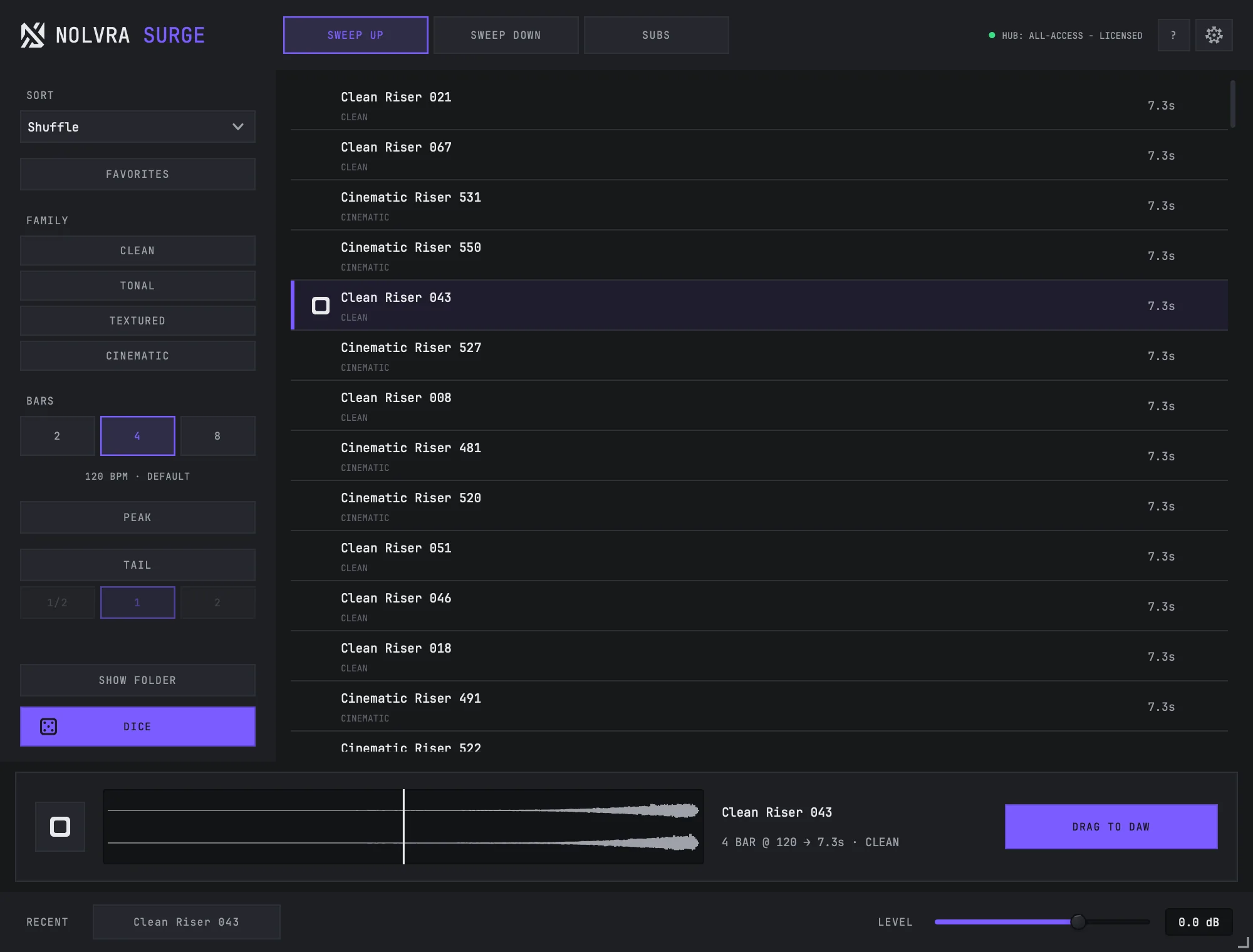
Your first sound
Open it on any track
SURGE loads as AU or VST3 on macOS and VST3 on Windows. It reads your host's tempo the moment it opens, so there is nothing to set up first.
Pick a shelf
SWEEP UP, SWEEP DOWN and SUBS are the three shelves. The list underneath is the whole bank for that shelf. Click any row to hear it — the deck at the bottom fills with that sound's waveform and transport.
Match the length
BARS sets how long the sweep runs in your project's time: 2, 4 or 8. The line under BARS is the tempo SURGE is matching — your host's, or the manual override in SETTINGS.
Audition the payoff, not the intro
PEAK starts previews at the last three seconds, where a riser actually pays off. Press it while something is playing and you jump straight there; press it again and you land back where you were.
Drag it out
Drag DRAG TO DAW straight into your timeline, or drag any row out of the list. The file is written to ~/Music/Nolvra/SURGE Exports, and SHOW FOLDER opens exactly that folder.

What carries over between sessions
Favourites, filters, BARS, PEAK and TAIL are remembered between sessions. Reopen SURGE tomorrow and the browser is where you left it.
The in-plugin tour can be reopened at any time with the ? button in the top bar, and it walks these same six controls without leaving your session.

The first launch is different
On its very first run SURGE downloads its sound bank. The bank is a single encrypted container that is fetched once, verified, and kept locally — after that the plugin opens straight into the browser with no network involved. If that first download does not complete, see the troubleshooting article on downloads.
Still stuck?
Nothing here matching? Write to a person.