Finding resonances with SCAN, and what MATCH is for
SCAN separates a resonance from a note by time rather than by loudness. MATCH reads the level your moves added or took away, so A against B is a fair comparison.
Why a scan can work at all
Loudness cannot tell a resonance from the music. A sung note is also a narrow peak standing well above its own neighbourhood, and when the scan was measured against 27 real mixes, stems, takes and drum loops, the notes in that material stood 13 to 37 dB above their surroundings, which is more than a deliberately planted ring managed. No threshold on loudness separates those two things. What separates them is time: music moves, and a resonance is the one thing in the spectrum that does not care what is being played.
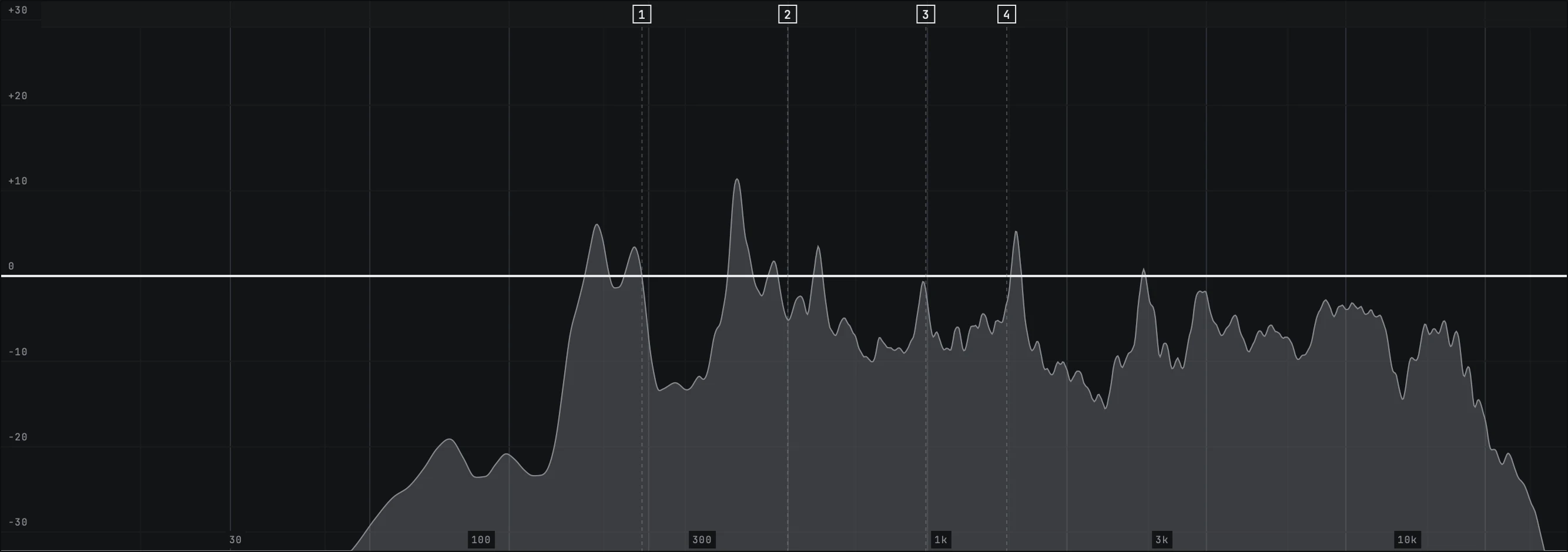
The five second window
SCAN watches a window five seconds long and reports a frequency only once it has been present through enough of that window. That length is not a round number somebody liked. In the same 27 files, 736 tracked frequencies stayed continuously present for a median of 1.25 seconds and, at the 99th percentile, 12.75 seconds, while a planted ring in the same material stayed up for 15 to 55 seconds. Five seconds is long enough for a melody to smear itself across the scale it is walking and short enough that the plugin answers you in five seconds.
Longer was measured too. Ten seconds cuts the clutter further, from 12.6 reported frequencies a minute down to 7.2, and it loses the planted ring on four more of the 27 files while doubling the wait. Five seconds keeps detection at 22 files out of 27.
This is why the scan has nothing to say in the first few seconds after you switch it on. It is not thinking. It is waiting for evidence, and it tells you how much it still owes.

Running a scan
Turn SCAN on and play the part
The scan group sits at the right hand end of the top strip. Play the section you actually care about rather than the whole song: the scan describes the material it heard, so a verse and a chorus scanned together give you the union of two different problems.
APPLY when the marks look right
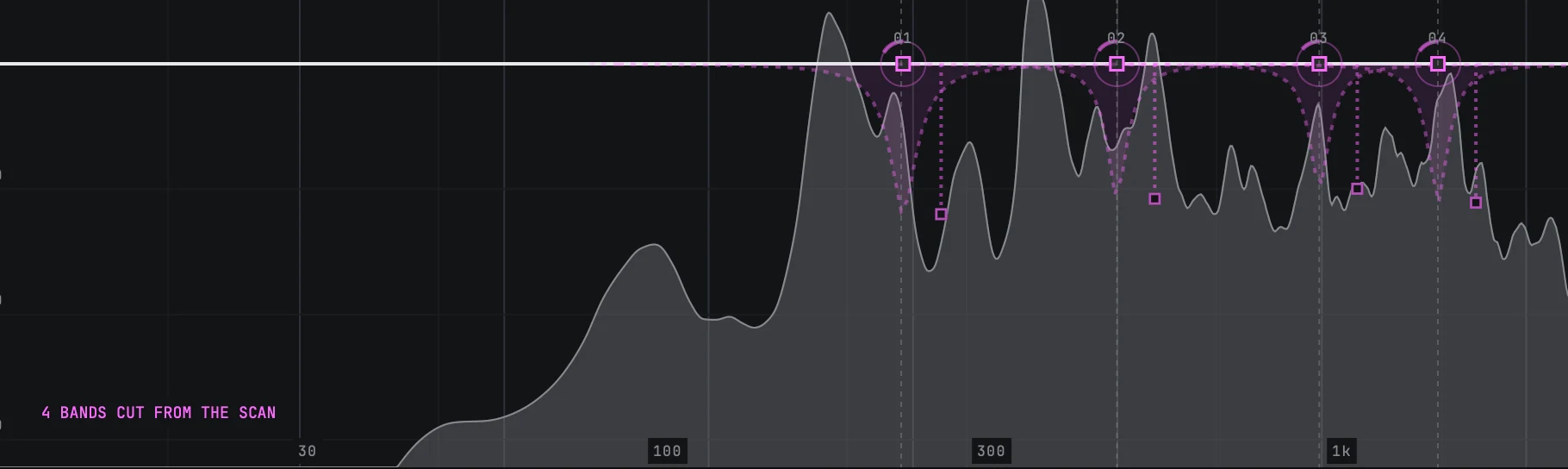
APPLY writes a band for each mark that is standing. The strip says how many it wrote, and if the 24 bands ran out it says how many went in, how many were on offer and how many bands are in use, rather than dropping any in silence.

The four scan settings are set in the host, not on the face
Sensitivity, Min Frequency, Max Frequency and Max Count are published parameters, and in 0.24.3 not one of them has a cell on the window. You set them where your host lists a plugin's parameters, and you automate them from the same place. The defaults are the ones the scan was measured on, so a first pass asks nothing of you here.
Sensitivity runs 0 to 100% and opens at 50%. That default sits on a measured knee: it is the last setting at which detection has not moved at all, 22 files out of 27, while the clutter has already come down by a factor of 3.5. Past the knee the product goes deaf faster than it goes quiet, so turning it up finds more and turning it down mostly finds less.
Min Frequency and Max Frequency bound the search. They open at 60 Hz and 16 kHz, which keeps rumble under the take and air above it out of the argument. Narrow them when you already know the register the problem is in.
Max Count is how many marks you want back, one to eight, and it opens at four. Two sightings within a semitone of each other are treated as the same thing, so a peak that wanders a few cents does not appear twice.
What APPLY actually writes
This is the part worth understanding, because it is not what most people expect from an automatic cut.
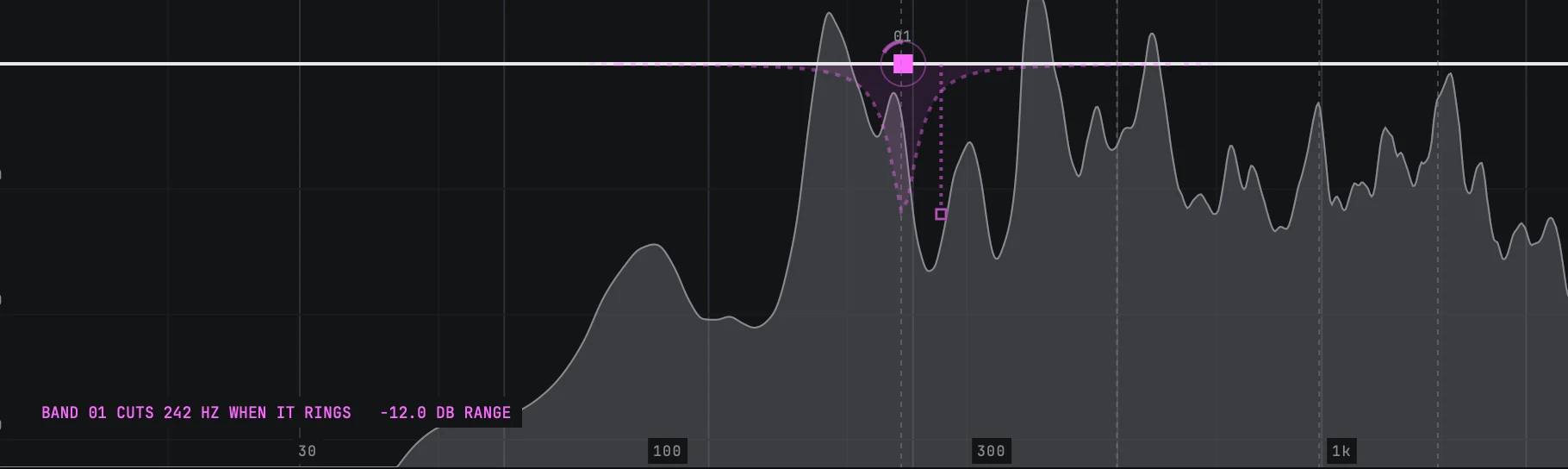
The band APPLY writes is a bell at the mark's frequency, with the Q the scan estimated, and its static gain is flat. The cut lives in the dynamic range instead: a negative range sized by how far that peak stood above its own neighbourhood, clamped between 1 and 12 dB. So the band does nothing while the frequency behaves and pulls down only while it rings. The gesture line says exactly that, in the form BAND 01 CUTS 220 HZ WHEN IT RINGS with the range beside it.
Where the scan could not estimate a Q it uses 4.0, and where it is offering a mark that has already ended it uses a stand-in for the prominence and labels the trace ESTIMATED, because a number nobody was told was a guess is a number that will be believed.

MATCH, and why it is not a lamp
MATCH is a reading, not a switch that improves the sound. Turn it on and it measures how much level your moves added or removed, then prints that figure on the chip itself: MATCH followed by a signed number in decibels.
The middle state is the point. With MATCH on and nothing measured yet the chip says MATCH and three dots rather than printing 0.0 dB, because 0.0 dB would be a claim about a measurement nobody has taken.
The reason to use it is the oldest bias in mixing. A curve that added 2 dB overall sounds better than the one that did not, whoever made it, and A against B decided on loudness is not a comparison. Copy your settings across with COPY A>B, change one thing on the other slot, and let MATCH take the level difference out of the decision.

Reading a scan honestly
- A frequency that only appears in one section is a section problem, not a resonance. Scan the section.
- If the scan marks nothing, that is an answer. It is not broken, and turning Sensitivity to 100% to make it say something is asking it to be wrong.
- A mark is a place and a moment. The time axis is where you check whether the ring was there for the whole take or for one line.
- APPLY is a starting set. Every band it wrote can be moved, reshaped, placed on mid or side, or emptied.
- MATCH tells you the level difference. It does not tell you which curve is better, and it is not trying to.
Still stuck?
Nothing here matching? Write to a person.