PRISM MINI: key, register and MIDI
Three ways to decide which note PRISM MINI plays, in a fixed order, plus the register the carrier sits in when nothing else is telling it what to play.
Three sources, one order
PRISM MINI never has to be told what to play: the engine follows the pitch of the voice it hears. You can take that decision off it two ways, and the order between them never changes. MIDI outranks the key and scale you set, which outranks the follower running free. Whatever is highest on that list is what is driving the line, and the strip in the top right of the stage always shows which one it is.
The order
- MIDI. You play the pitch. Nothing is quantised, because you already chose the note.
- KEY and SCALE. Every note the engine decides on is quantised into the scale you set.
- Free. The follower drives on its own, and OCT sets the register it sits in.
Setting the key
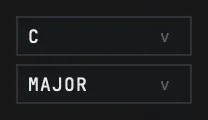
The key is two boxes, side by side in the middle of the control row. The upper one is the root, twelve of them. The lower one is the scale. A fresh instance reads C and MAJOR, so quantising is on out of the box rather than waiting to be switched on.
There is no separate key lock switch, and there does not need to be: the scale box is the switch as well. With two controls, the meaningless state of a lock that is on while no scale is chosen would have been reachable.
Major and minor
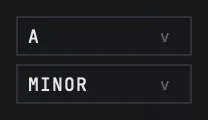
Those are the two the box offers. Set a root and a scale and every note the engine decides on lands inside it: the follower still hears what you sang, but what comes out is quantised into the scale before it reaches the carrier.
The parameter underneath keeps a longer list than the box shows, and that is on purpose rather than an oversight. A preset written in the paid plugin stores the scale as a value, so trimming the list here would have put MINOR where the other product wrote MAJOR the first time a preset crossed between them. One consequence is worth knowing because a host can reach it: if something outside the plugin sets the scale to a value this face has no row for, the reading falls back to CHROMATIC and stays there, because the mechanism that would decide a key on its own is not in this product.
Playing it from a keyboard
Send MIDI to the plugin and the keyboard plays the pitch. MIDI is the top of the order, so nothing is quantised while a note is held: you already chose the note, and the key and scale stop acting for as long as the keyboard is driving.
The strip is the test. It names MIDI the moment a note actually arrives, and if it never changes then the notes reached the track and stopped short of the device. PRISM MINI is an audio effect on an audio track, and most hosts send MIDI to instruments rather than to effects, so the notes have to be pointed at the device and not only at the track.
PRISM MINI gives the voice back on its own. Seven seconds after the last note is released, the follower takes the line again, so a rest in the middle of a take does not hand the whole song to a key that was let go minutes ago. One thing deliberately does not count as MIDI: a panic. All Notes Off and All Sound Off are what a host sends when the transport changes, which includes pressing Record, so arming a channel cannot silently take the follower away from you.

Ableton Live
Put PRISM MINI on the vocal track
Drop it onto the audio track that carries your voice. In Live's browser it appears twice, once as an Audio Unit and once as a VST3; either is fine.
Add a MIDI track
Command-Shift-T. Nothing about the MIDI track needs configuring except its output.
Point MIDI To at the audio track
In the MIDI track's header, open the MIDI To chooser. Every track that can receive MIDI is listed, and the audio track holding PRISM MINI is one of them because the plugin is on it. Pick it.
Pick the device in the second chooser
A second chooser appears underneath, listing the MIDI-receiving devices on that track, one entry per MIDI channel. Channel 1 is the normal choice, and the number in front of the name is the MIDI channel rather than a device number.
Arm the MIDI track
Arm it, or set its monitor to In. Play, and the strip inside PRISM MINI names MIDI.
The hosts below were not done here
Live above was done on a machine, step by step. The hosts that follow were not tried with this product, so what is written for them is the shape of the route rather than a route we watched work. Read them as a starting point rather than a recipe, and tell us where they are wrong: a correction with the real menu name is more useful to us than a bug report, and anything we can reproduce here moves up into the tested half of this article.
Two things carry across all of them. PRISM MINI has to be on the channel that already carries the voice, and the notes have to reach the device rather than the channel. The strip inside the plugin is the test in every host.
FL Studio, untested here
Let FL find the plugin first
FL does not scan for new plugins on its own, so a plugin installed after FL was last opened is not in its database. Open the Plugin Manager and run a scan of installed plugins; until it does, a search returns nothing, which reads like a failed install and is not one.
Put PRISM MINI on the vocal insert
In the mixer, select the insert your vocal is routed to and load the plugin into one of its effect slots.
Give the plugin a MIDI input port and match it
FL addresses this with numbers rather than menus: the plugin's own wrapper settings carry an input port field, and a MIDI Out channel in the channel rack carries a port field. The route exists when the two numbers agree.
Read the strip
Play the MIDI Out channel and watch the strip inside PRISM MINI for MIDI.
Cubase, Studio One, Reaper and Bitwig, untested here
Put PRISM MINI on the vocal channel
Insert it on the channel that already carries the voice, the same way you would insert any effect.
Point the notes at the device
Where a host can do this, plugins that accept MIDI appear as a destination in a MIDI or instrument track's output list. Reaper is the exception in shape: it carries MIDI through a track's own effect chain, so a MIDI item on the same track is expected to be enough.
Read the strip
Play and watch the strip inside PRISM MINI. MIDI means the notes arrived.
If the destination is not offered
Menu wording and routing behaviour move between versions of all four, and none of them was tried here. If your version does not offer a plugin as a MIDI destination, this route is not available to you there, and the plugin still follows the voice with no MIDI at all.
Choosing the register
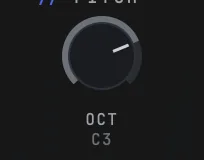
OCT is an anchor rather than a transpose. It sets the register the built-in carrier sings in when nothing else is telling it what to play, and it reads as a note rather than as a number, C3 on a fresh instance. The note line names the same value as the ANCHOR, so the reading over the stage and the knob under it are saying one thing rather than two.
It runs from C0 to C5 and it reads whatever note it lands on, so it is not restricted to whole octaves. Note that it is not the pitch the plugin plays: the follower decides that, and this decides which register the decision comes out in. While a keyboard is driving, the anchor steps aside for the same reason quantising does: the keyboard already chose the note.
What the key is not
Chord detection from a sidechain and a key detector that works the key out for you are both in the paid plugin and neither is in this one. That is a cut rather than a lock: there is no dimmed control, no greyed chip and nothing on the face that hints at a fourth rung, because the strip has three rungs and the product has three sources.
Presets do not touch your key either. None of the four factory slots writes the root, the scale, the mix or the output, so choosing your song's key once is enough and no slot takes it back.
Still stuck?
Nothing here matching? Write to a person.