PRISM MINI, the DRY knob
One lever over the two paths that carry your own voice out under the talkbox. The middle of the knob is the level the plugin has always had, so it opens where you left it.
What the knob is over
Push MIX all the way over to the talkbox and some of your own voice still arrives at the output. That is not leakage and it is not a fault: two paths are built to carry it, the consonant routing above 1.7 kHz and the air path above 6 kHz, and they are the reason a talkbox phrase can be understood as words rather than as a tone with a shape on it.
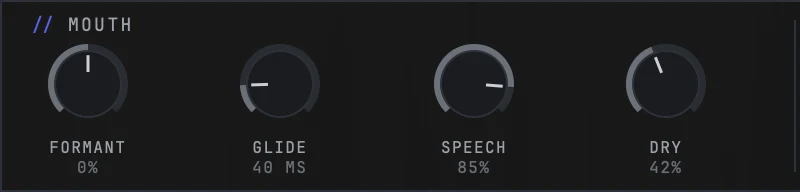
DRY is one lever over both of them. It is the fourth knob in the MOUTH band, after FORMANT, GLIDE and SPEECH, and it reads as a percentage.
The two paths are one control on purpose. The thing people notice is one thing, a dry voice sitting under the effect, so the move that answers it is one thing as well. Splitting them would have handed over an axis the code separates rather than an axis the ear does.
The middle is where you already are
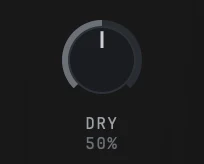
The knob opens at 50%, and at 50% its gain is exactly 1.00. That is not approximately today's level, it is today's level: the middle of this knob is the amount of your own voice the plugin has always let through, and it was chosen as the middle precisely because the control needs a way down and a way up from a reference.
The consequence is worth stating plainly. Nothing about the sound changed when this knob appeared. The engine was already reading the value and the factory slots were already writing it; what arrived was the knob. Rendered against the previous build across nine sources and twelve conditions, every one of the hundred and eight pairs came back bit identical, and the middle of the knob renders the same file as the plugin's own defaults do.
Setting it
Start on a phrase with words in it
Use a take with consonants and breath in it rather than a held vowel. On sustained singing this knob does very little, because there is not much for the two paths to carry. It was measured on both: on a vocal with words in it the whole travel of the knob sat about 21 dB under the output, and on a sung take of long vowels it sat 46 dB under. That is the material talking, not the control.
Turn it down when the voice is showing through
Below the middle the taper is cubic rather than straight, and that is a measurement rather than a feel. On a straight taper the entire lower half of the knob covers only the first 6 dB and the whole closing move crushes into the last few percent of travel, which is the class of defect where half a knob looks dead. The cube spreads it out: 40% is 5.8 dB down, 25% is 18.1 dB down, 10% is 41.9 dB down, and 0% is a measurable zero with both paths silent.
Turn it up when the words are not landing
Above the middle the knob opens the same two paths by up to 6 dB at 100%. This is the move for a phrase that sounds right but reads as mush: the consonants and the breath come back up and the words arrive, at the cost of the effect sounding a little less like a single instrument.
Leave it where the slot put it if the slot sounds right
The factory slots carry their own value for this and those values are not new. Turning the knob after loading a slot is a change to that slot, and the star on the preset name says so.

What you hear at the three positions
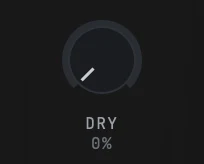
At **0%** both paths are silent. The consonants and the breath go with them, and what is left is the talkbox alone. It is the most obviously processed the plugin gets, and on some material it is exactly what you want.
At **50%** you hear what PRISM MINI has always sounded like. If you never touch this knob you will never notice it arrived.
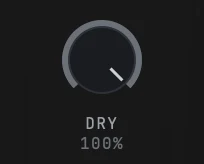
At **100%** your own voice is 6 dB louder underneath the talkbox. The difference lives almost entirely at and above 2 kHz, so what actually changes is the sibilants, the plosives and the breath between lines rather than the body of the note.
Between the three there is no click. The ramp is the one the parameter already had and it did not change in this release.
Why the presets are not all on the middle
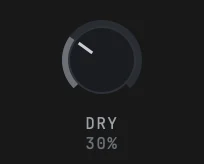
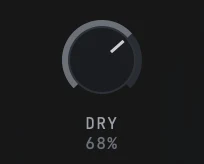
The four factory slots do not sit at 50%. TUBE, which is where a fresh instance opens, writes 42%. CHEST writes 30% and TEETH writes 68%. CRY does not write the parameter at all, so it lands on the middle.
Those are the values the slots already had before the knob was drawn, which means they are the values that made the slots sound the way they sound. Moving all four to the middle for tidiness would have changed three of them, and the whole point of this release is that nothing about the sound moved. So the knob now shows what the slots were doing rather than overwriting it.
If you want a slot on a different amount of your own voice, turn the knob and save your own beside it.
Practical notes
- The number of parameters your DAW sees did not change. This parameter was always published, so an automation lane written before the knob existed still reads the same.
- The two ends and the middle are exact by construction rather than by rounding, which is what lets the middle be described as unchanged rather than as nearly unchanged.
- On a held vowel the knob will feel weak. That is correct behaviour, not a broken control.
- SPEECH and DRY are not the same thing. SPEECH decides how much consonant detail survives the talkbox itself; DRY decides how much of the source's own consonants and air arrive alongside it.
- The knob is the fourth in the MOUTH band, which means the band now reads FORMANT, GLIDE, SPEECH, DRY from left to right.
- It arrived in 1.0.5. On an older install the MOUTH band shows three knobs and the value is still there, being set by whichever slot you loaded.
Still stuck?
Nothing here matching? Write to a person.