Freeze: holding the tail in PLUME
What FREEZE holds, the three modes it works in and why it is greyed out in the other three, and what the face reads while a tail is frozen.
What FREEZE does
FREEZE takes the reverb tail that is sounding at that moment and holds it. The tail stops decaying and stays at a steady level for as long as FREEZE is on, while your track carries on over it. Switch it off and the tail falls away the way a tail normally does.
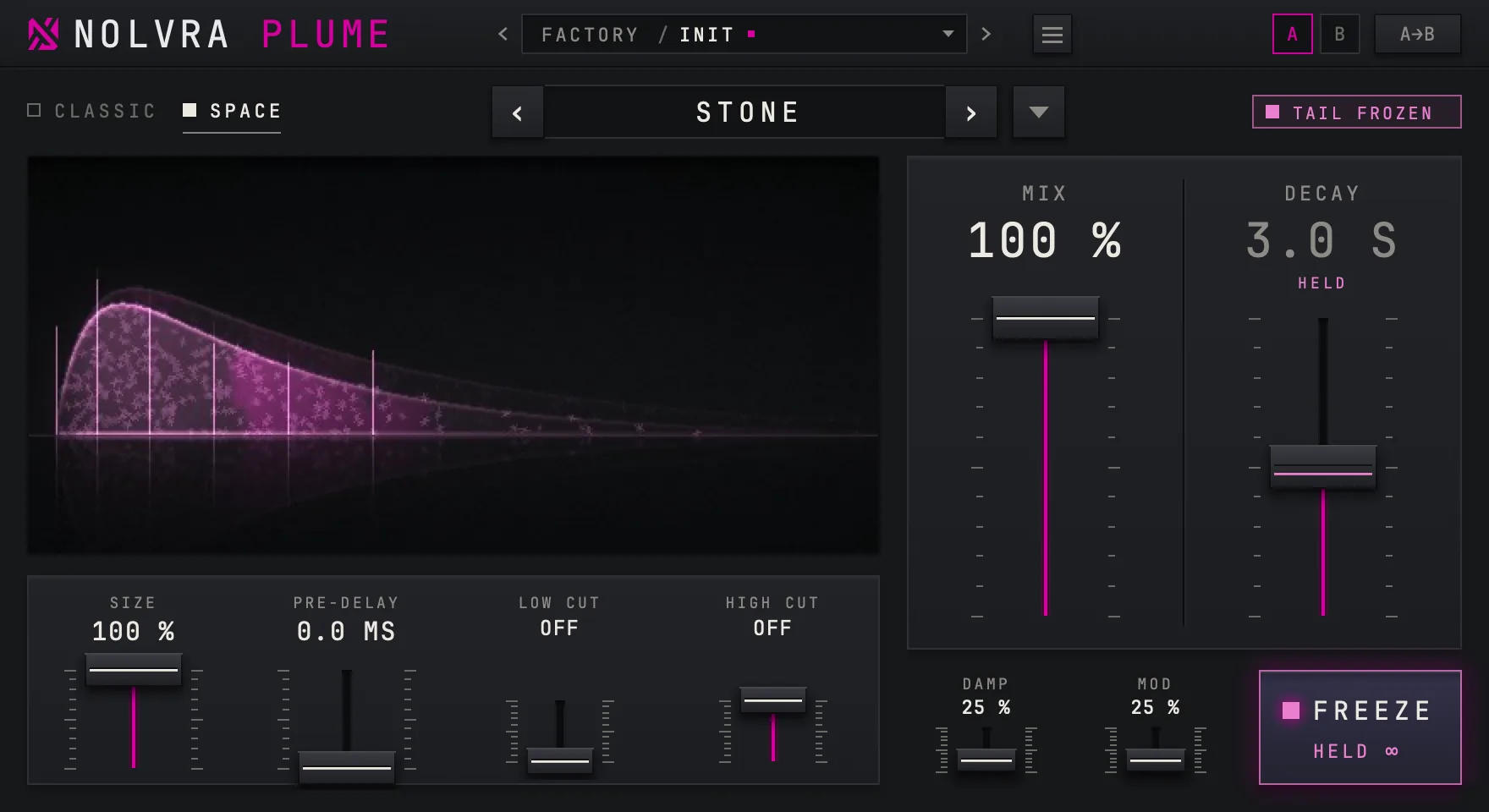
It works in three of the six modes: PLATE, STONE and MIST. In SILK, CHAMBER and VOID the button is greyed out and reads N/A.


Holding a tail
Choose a mode that has FREEZE
PLATE in any of its eras, STONE or MIST. If the button reads N/A, you are in one of the other three modes.
Let the tail build
FREEZE holds what is already in the tail. Play the note or the chord first and engage FREEZE while it rings; on silence there is nothing to hold.
Press FREEZE
The button lights, its line reads HELD with the infinity sign, TAIL FROZEN appears at the top right of the face, and the DECAY reading shows HELD under its value. Engaging it ramps the tail's losses down over a few milliseconds rather than at once, so it does not click.
Play over it, then release
Play on top of the held tail. Press FREEZE again, or move the automation off, and the tail decays from where it stood.


Why three modes and not six
In SILK and CHAMBER the tail passes a soft saturation stage on every trip round its loop. A frozen tail would keep passing it and slowly lose level, so instead of a FREEZE that fades, those two modes have none. VOID is built differently from the other SPACE modes and has no FREEZE either.
The rule is kept by the plugin, not only by the button. In a mode without FREEZE, clicking the button changes nothing, and if your host's automation turns the parameter on, PLUME still keeps the tail unfrozen.

What turns it off
Changing the mode turns FREEZE off, because a held tail belongs to the mode that froze it, and the new mode starts with an empty tail anyway. If you want a frozen tail across a section of a song, automate FREEZE and leave the mode alone for that stretch.
Presets built around it
The FREEZE & DRONES folder holds 19 presets built around a held tail. Every one of them is in PLATE, STONE or MIST, with a DECAY between 14 and 65 seconds, so the tail is long before you even press FREEZE. Every factory preset in a mode that has FREEZE was measured while frozen: it holds steady without building up and falls away after release, 104 presets in all.
Questions this page answers
- FREEZE is greyed out. You are in SILK, CHAMBER or VOID; it works in PLATE, STONE and MIST.
- I pressed FREEZE and nothing was held. FREEZE holds the tail that is already there; play first, then press it.
- FREEZE switched itself off. A change of mode turns it off.
- My automation turns FREEZE on in CHAMBER and nothing happens. PLUME keeps it off in the modes that do not have it, whatever the automation says.
- DECAY reads HELD. While the tail is frozen its length does not come from DECAY.
Still stuck?
Nothing here matching? Write to a person.