INTONE quickstart
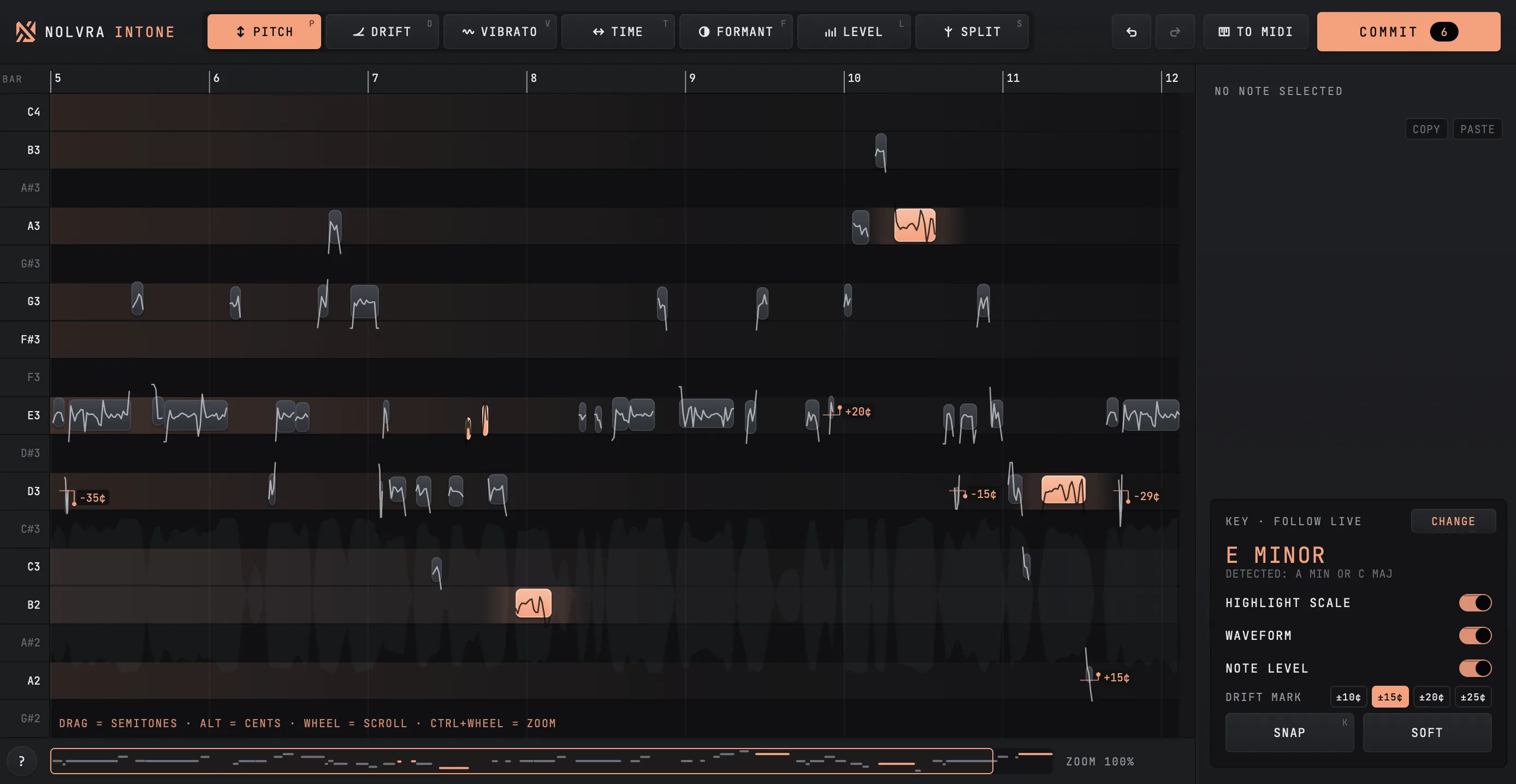
Open a vocal clip, drag its notes, set the key and SNAP, then COMMIT to a take lane. The first pass through INTONE inside Ableton Live.
What INTONE is
INTONE is a vocal pitch editor that lives inside Ableton Live. It is a Max for Live audio effect: you put it on the track that holds your vocal, open the clip in it, and edit the vocal note by note. There is no recording pass, because INTONE reads the clip that is already on the track. When you are happy, COMMIT renders the edited vocal to a new clip and keeps the original on a take lane.
INTONE needs Ableton Live 12 Suite with Max 9 or later, on macOS 14 or later or on 64-bit Windows, and Nolvra Hub installs it.
Your first pass
Put INTONE on the vocal track
In Live's browser go to User Library, then Presets, Audio Effects, Max Audio Effect, and drag INTONE onto the audio track with your vocal. It has to be an audio track: on a group, return, main or MIDI track INTONE says "INTONE must be on an audio track (not a group, return, main or MIDI track)".
Open a clip
Select your vocal clip in Live, then press OPEN. Or drag the clip onto OPEN. The vocal appears as notes on a piano roll. If the clip is warped in Beats mode, INTONE warns "BEATS MODE: edited notes may drift. Click here to switch the clip to Complex". Click the warning to switch, because Beats mode re-slices the result and moves the notes you edited.
Grab a note
Hold a note and drag it up or down. You hear it at its new pitch while you move. PITCH moves in semitones; hold Alt to move in cents, and double click a note to snap it to the key.
Pick the tool for the job
One tool per job, each with its own key: P pitch, D drift, V vibrato, T time, F formant, L level, S split. Hover any button for a short description.
Set the key, then SNAP
Click the key to follow Live or set your own. K, or the SNAP button, pulls every note onto the key.
COMMIT, and undo whenever you like
COMMIT renders the edits to a new clip; the original stays on a take lane named INTONE original. Every edit is a step in Live's own undo, so Live's Undo and Redo walk back through them.



The tools
- ToolWhat it does
- PITCH (P)Drag up or down by semitone. Alt moves in cents, a double click snaps to the key
- DRIFT (D)Straightens the pitch drift inside a note. The left edge sets the transition into it
- VIBRATO (V)Drag up for more vibrato, down for less. 0 % is flat
- TIME (T)Moves a note. Drag its edges to stretch it. The gap stays silent. Q opens quantize
- FORMANT (F)Makes the voice brighter or darker without changing the pitch
- LEVEL (L)Note volume. The edges set fades, Alt and drag works on sibilants, M mutes
- SPLIT (S)Click a note where it should be cut. Alt and click joins two notes
Key, drift mark, SNAP and SOFT
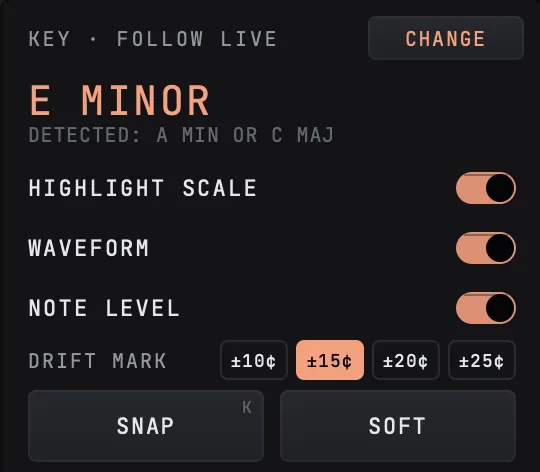
The KEY box has two settings. FOLLOW LIVE uses the key and scale set in Live. MANUAL lets you set the device's own key. When INTONE guesses a key from the vocal it shows it as DETECTED.
The DRIFT MARK sets how far a note may drift before INTONE marks it with its cents: ±10, ±15, ±20 or ±25 cents, and it opens at ±15. You set it in the KEY box of the large window.
SNAP pulls every note to the key. SOFT brings the notes closer to the key and keeps their drift and vibrato.

The large window
W opens INTONE in a large window of its own, and the drift mark is set there. Shift and F fits the clip into view. The editor's hint line lists the mouse moves for the tool you are on, for example WHEEL = SCROLL and CTRL+WHEEL = ZOOM.
Things people look for on the first day
- Editing works without a license. Preview, COMMIT and TO MIDI need one; the setup article explains how INTONE unlocks.
- Backspace or Delete resets the selected notes.
- M mutes the selected notes, and pressing it again unmutes them.
- Q opens quantize for timing and N opens note leveling. Enter applies, Esc closes.
- TO MIDI copies the notes, as edited, to a new MIDI track below, in one undo step.
- A COMMIT over a COMMIT renders again from the original while the notes still match it, in one undo step.
What ships
- ItemINTONE 1.0.0
- FormatMax for Live audio effect
- HostAbleton Live 12 Suite with Max 9 or later
- SystemsmacOS 14 or later, 64-bit Windows
- ToolsPITCH, DRIFT, VIBRATO, TIME, FORMANT, LEVEL, SPLIT
- Keyfollows Live, or set your own
- Drift mark±10, ±15, ±20 or ±25 cents
- ResultCOMMIT to a new clip, the original on a take lane
- Install and unlockNolvra Hub, no license key
Still stuck?
Nothing here matching? Write to a person.