IMAGER quickstart
Three width knobs, two crossovers and a gauge that prices the mono fold-down in dB. The first useful move is not a width, it is deciding where the low band ends.
What IMAGER is
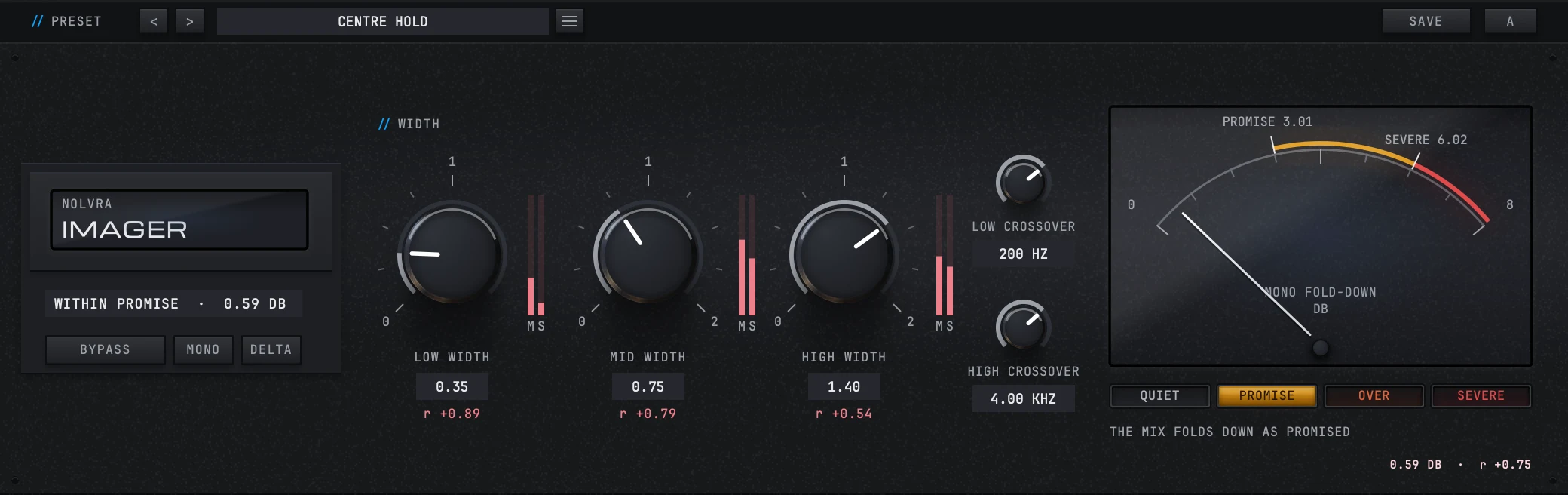
IMAGER is a three band stereo imager. It splits the material into a low, a mid and a high band, puts a width control on each one, and measures what the result loses on the way to mono, continuously, in dB. It runs as AU, VST3 or a standalone app on macOS 11 or later, Apple Silicon, and as VST3 or a standalone app on 64-bit Windows.
What makes the first five minutes different from other width tools is the gauge under the knobs. Widening is a trade, and the bill for it arrives later, on a phone speaker or a club system that sums the mix down. The gauge is that bill, in dB, while your hands are still on the controls.
Your first pass
Install it, then open either door
The Nolvra Hub installs IMAGER and keeps it updated. On macOS everything lands in your home folder rather than the system one, so no admin password is asked for: the VST3 into ~/Library/Audio/Plug-Ins/VST3, the AU into ~/Library/Audio/Plug-Ins/Components and the app into ~/Applications. On Windows the VST3 goes into C:\Program Files\Common Files\VST3 and the standalone app into C:\Program Files\Nolvra\IMAGER. Two things unlock it and either one is enough on its own: an IMAGER licence key, which reads IMAGER-XXXX-XXXX-XXXX and goes into the plugin's activation screen, or an active All-Access membership on the account you are signed into in the Hub. A key owner never has to sign in and a member never has to type a key. One licence covers two machines. Rescan plugins in your DAW afterwards if IMAGER does not appear on its own.
Put it where the picture is decided
It is an audio effect, and it belongs where the stereo image is actually being set: a group bus, the mix bus or the master. It reports zero latency, active and bypassed alike, so a copy on one bus does not shift that bus against the others.
Set the low crossover before you set a width
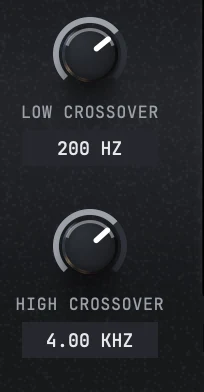
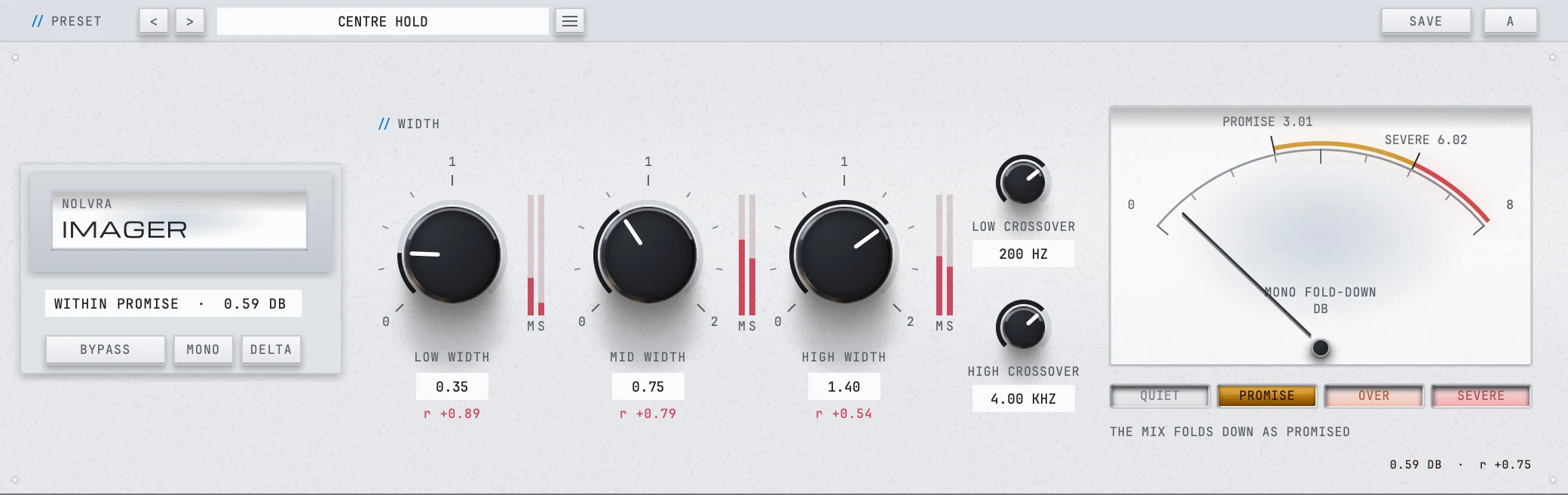
LOW CROSSOVER is the line under which the whole bottom of the record becomes one decision, so it is the number to place first. It runs 40 Hz to 400 Hz and opens at 120 Hz, and its control is deliberately skewed so that single hertz are reachable near the bottom of the range, which is where that decision gets made. HIGH CROSSOVER runs 800 Hz to 8 kHz and opens at 2500 Hz. It is the line between the body of the mix and its air, and moving it is how you decide whether the cymbals and the top of a pad belong to the band you are opening.
Then set the three widths
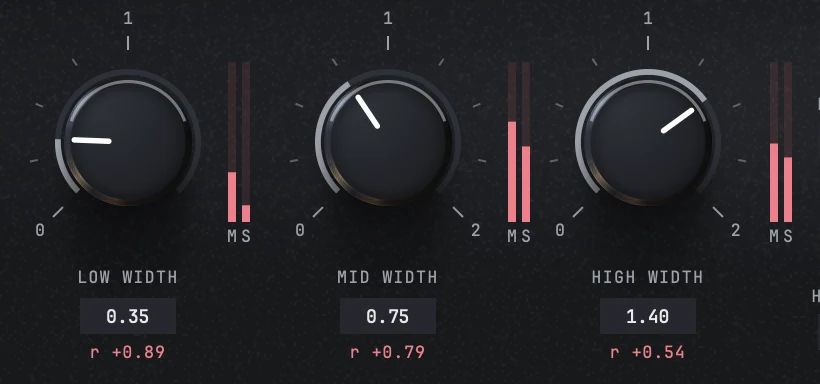
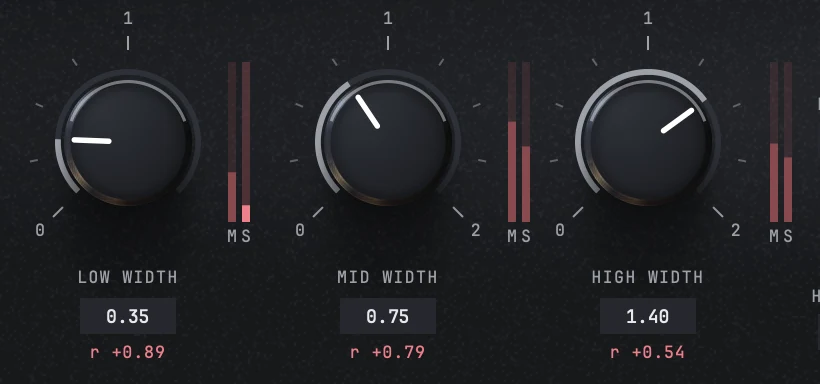
LOW WIDTH, MID WIDTH and HIGH WIDTH are the three framed knobs. The number on them is a ratio and not a percentage: 0.00 is mono, 1.00 is the width the signal arrived with, and 2.00 is twice the side level. There is no skew on them, so the centre detent sits in the middle of the control where you can find it without looking. Drag to set one, double click to put it back where it opened. LOW WIDTH stops at 1.00. The low band can be narrowed all the way to mono and cannot be widened at all, and the ceiling is on the parameter rather than inside the engine, so your host, your presets and your automation lane all see the same limit. That has its own article.
Read the gauge, then decide
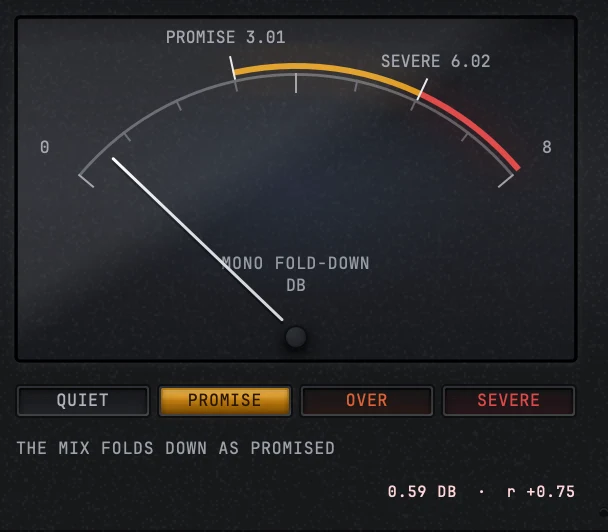
The gauge under the knobs prints the fold-down loss in dB with the correlation beside it, on a scale with two lines drawn on it: PROMISE 3.01 and SEVERE 6.02. Under the first line the reading is WITHIN PROMISE, between the two it is OVER PROMISE, and above the second it is SEVERE. Nothing about that reading is a preference. It is measured at the plugin's own output and it has its own article too.
What you hear
At 1.00 on all three bands you hear the material, unchanged in level, in correlation and in image. That is worth knowing rather than assuming, because the plugin is doing real work at that setting: the mid signal is split into bands and summed again even though its band gains are all 1.00, so that it stays phase locked to the side signal, which has just been through the same network.
Move a width down and the band's side content gets quieter while its centre stays exactly where it was. Move it up and the side content gets louder, again with the centre standing still. That is the whole mechanism, and it is why the mono sum does not move when you turn a width knob: what you are changing is the part of the signal a mono system was never going to receive.
MONO folds the output down with the same sum the gauge measures, which is the fastest way to hear what the reading is talking about. DELTA plays what the plugin is adding and nothing else, so if a move is doing less than you thought, DELTA is where that shows up. Neither of them, and no solo, can change the number on the gauge.


The preset bar and the settings menu
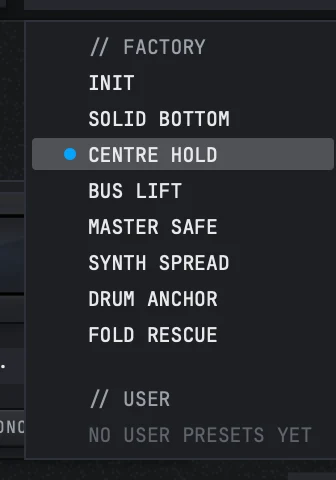
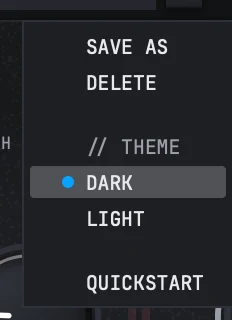
The preset bar sits along the top and there are two doors on it. The name cell opens the preset library, which holds the shelf, SAVE AS and DELETE. The three lines open the settings menu. The arrows either side walk the shelf one step at a time, and SAVE keeps what you have.
A and B are two whole settings and the button swaps between them: it puts what you have into the seat you are leaving, then loads the other one. They start out identical, so the usual way to try an alternative is to swap once and change one thing, then swap back to compare. The name on the bar does not follow the seat, because a seat is a state and the name goes on saying where that state came from.
The factory shelf opens with INIT, which is the plain state and the same one a first launch shows, and after it come seven presets named for the job rather than for their numbers: SOLID BOTTOM, CENTRE HOLD, BUS LIFT, MASTER SAFE, SYNTH SPREAD, DRUM ANCHOR and FOLD RESCUE. Each one sets three widths and both crossovers, so a preset here is a starting position rather than a sound.
The settings menu carries a THEME section with a dark row and a light row, and a QUICKSTART row that reopens the three step tour the plugin shows on a first run. The geometry is identical in both themes, and the choice is kept in the plugin's own settings file rather than in the session, so it follows you to the next project on that machine.

Things people look for on the first day
- The width number is a ratio. 1.00 means unchanged, and it is the middle of the knob.
- Double click on a knob puts it back to what it opened on: 1.00 for a width, 120 Hz and 2500 Hz for the crossovers.
- The low band cannot be widened. If the knob will not go past 1.00, that is the product and not a fault.
- Every one of the three listening controls is a published parameter, so a host can see that a solo is running rather than being blamed for a mix nobody could explain.
- The six M and S columns under the knobs are the solo taps as well as the meters. Click one to hear that band's mid or side on its own, and click it again to turn it off.
- The reading says QUIET rather than a number when the material is below the level floor. It is not a fault, it is the plugin declining to print a figure about silence.
- The wheel turns a knob and nothing else. It does not walk the preset shelf, throw a switch or move the solo, because a scroll over one of those would be the pointer changing a setting the hand never aimed at.
What ships
- ItemIMAGER 0.8.7
- Bands3: low, mid and high, one width control each
- Width0.00 to 2.00, linear in the ratio
- Low band0.00 to 1.00, the ceiling on the parameter itself
- Low crossover40 Hz to 400 Hz, opens at 120 Hz
- High crossover800 Hz to 8 kHz, opens at 2500 Hz
- Fold-down readingmeasured at the output, in dB, with lines at 3.01 dB and 6.02 dB
- Per band meteringmid level, side level and correlation
- ListeningDELTA, MONO and a solo with six taps
- Presets7 factory, named for the job, plus INIT and your own
- Themesdark and light, the same geometry in both
- Latencyzero, active and bypassed
- FormatsAU, VST3 and a standalone app on macOS, VST3 and a standalone app on Windows, 64-bit
- Activationan IMAGER licence key or All-Access, 2 machines
Still stuck?
Nothing here matching? Write to a person.