GLOAM quickstart
Put GLOAM on the harsh track, set DEPTH by ear and check what it takes with DELTA. The first pass through the free resonance suppressor, and what to do when something looks wrong.
What GLOAM is
GLOAM is a resonance suppressor. It listens to the track all the time, finds the frequencies that stand out from their neighbours and ring, and turns each one down only for as long as it rings. A static EQ cut stays in for the whole song; GLOAM moves with the material.
It is free. There is no account, no license key, no activation and no time limit, and every control is open. It runs as VST3 and Audio Unit on macOS 11 or later on an Apple Silicon Mac, and as a 64-bit VST3 on Windows 10 or later.
Your first pass
Install it
If you use Nolvra Hub, GLOAM is in its list marked FREE: press INSTALL and the Hub runs the installer for you. You can also download the installer for your system from the GLOAM page on nolvra.com. Either way there is nothing to sign in to inside the plugin. Rescan plugins in your DAW afterwards if GLOAM does not appear on its own.
Put it on the track that hurts
A vocal, a hi-hat bus, a guitar, the mix bus. GLOAM is an audio effect and takes mono or stereo. It opens at a light setting that is already doing something, so the first thing to do is listen.
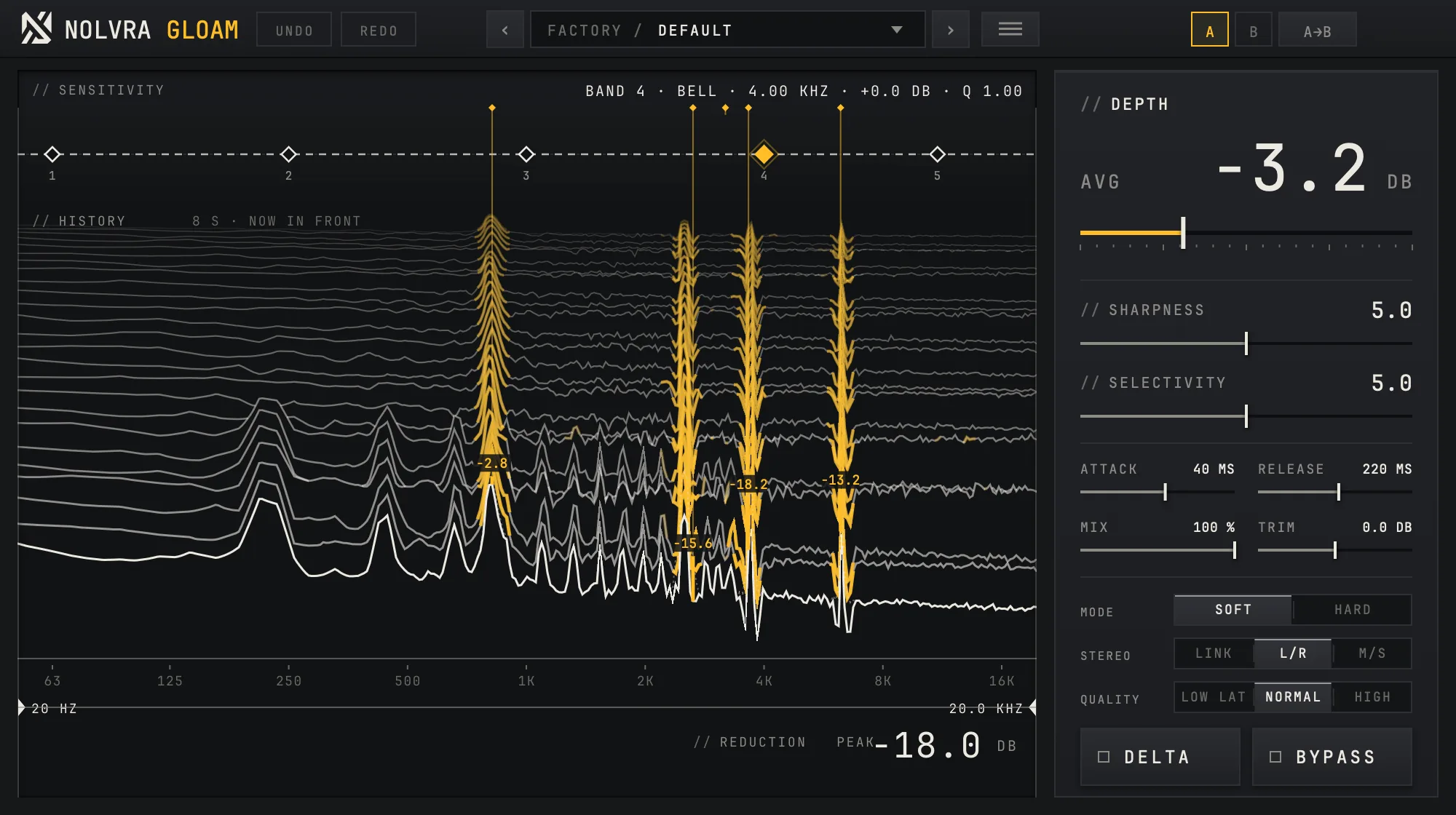
Watch the display
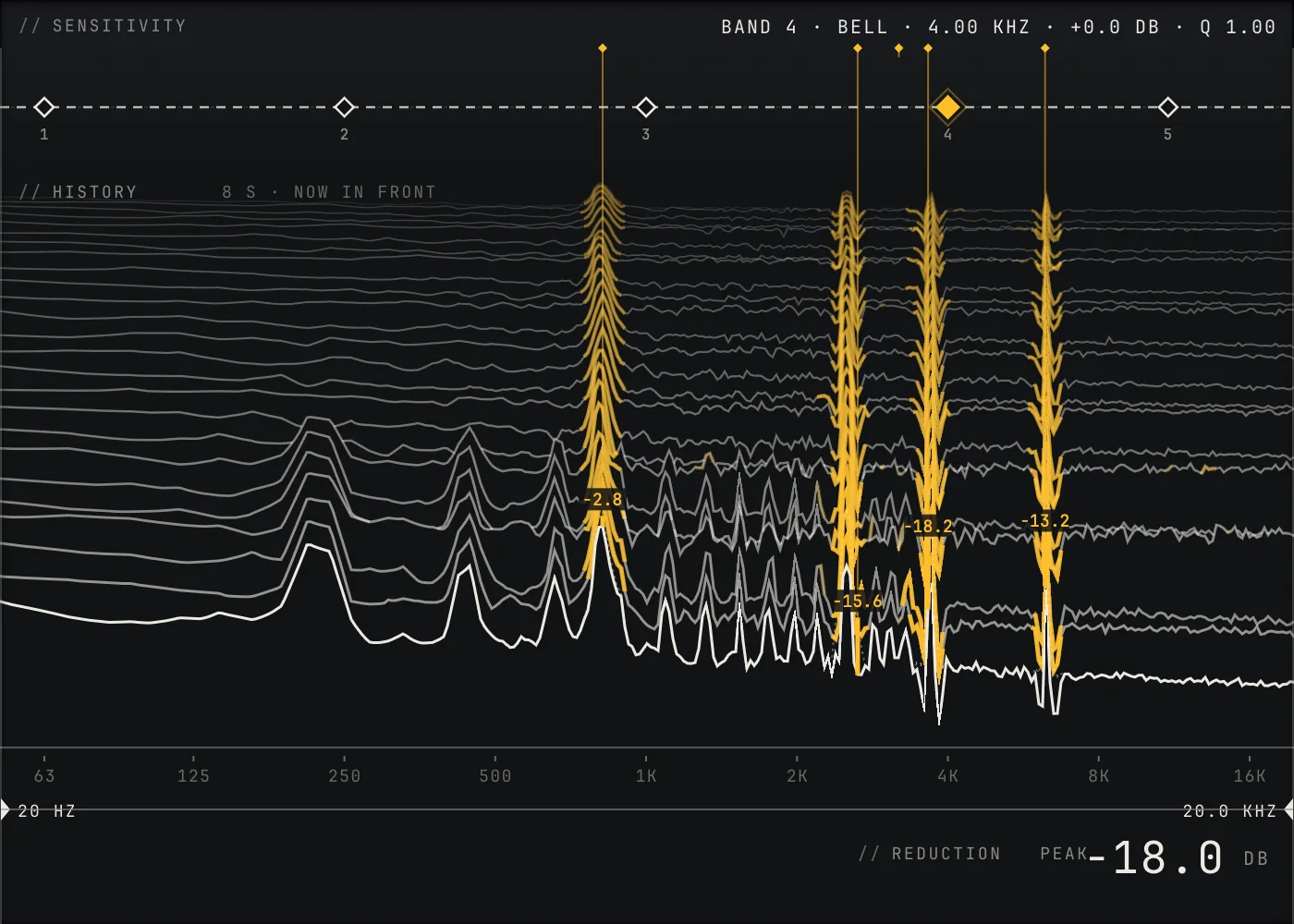
The HISTORY shows the last eight seconds, newest in front. Each saffron column is a ring GLOAM is turning down, and the number on it is how far, in dB. REDUCTION PEAK at the bottom reads the deepest cut right now.
Set DEPTH by ear
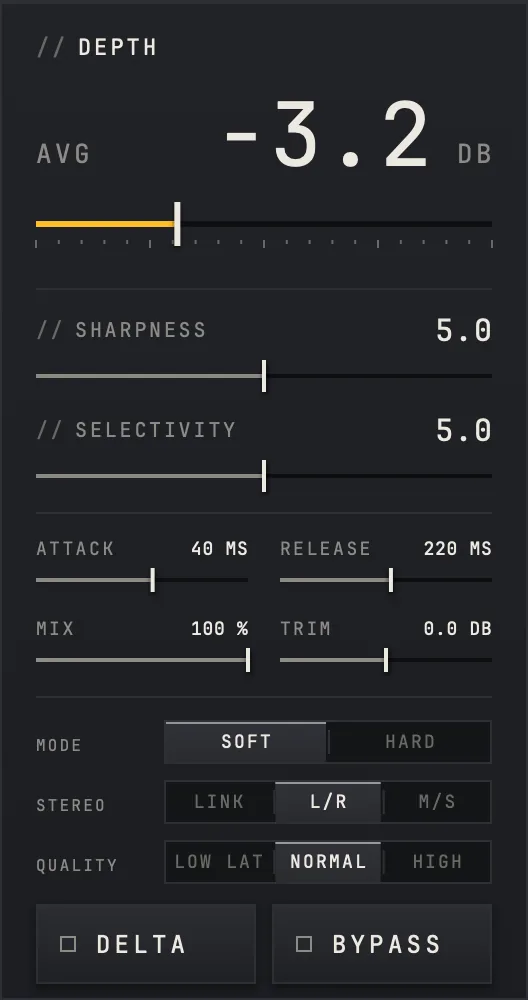
DEPTH sets how far GLOAM may cut. Its readout is the average cut in dB, so the number means what you hear. Raise it until the harshness sits back, and stop before the track loses its edge.
Check what it takes with DELTA
DELTA plays only what GLOAM removes. You should hear thin, whistling or boxy rings. If you hear the singer in it, it is taking too much: lower DEPTH or raise SELECTIVITY. BYPASS switches GLOAM off, so you can compare with what you had.

The controls on the rail
- ControlWhat it does
- DEPTHHow far GLOAM may cut, 0 to 100 %, read as the average cut in dB
- SHARPNESSHow narrow the cuts are, 0 to 10
- SELECTIVITYHow much a peak has to stand out before it is touched, 0 to 10
- ATTACKHow fast a cut comes in, 5 to 200 ms
- RELEASEHow fast it lets go, 40 to 1000 ms
- MIXBlend with the dry signal, 0 to 100 %
- TRIMOutput level, ±12 dB
- MODESOFT or HARD
- STEREOL/R, LINK or M/S
- QUALITYLOW LAT, NORMAL or HIGH
- DELTAPlays only what GLOAM removes
- BYPASSSwitches GLOAM off
Focus and sensitivity
The two handles under the frequency scale set the focus: GLOAM only works between them, anywhere from 20 Hz to 20 kHz. Pull them in to leave the low end or the air alone.
The five points across the top of the display are the sensitivity bands, each a bell or a shelf of up to ±12 dB. Raising a band lowers the level at which a ring in that range starts to be cut, so GLOAM gets more eager there; lowering it makes GLOAM leave that range alone. The line above the points names the selected one, its shape, frequency, gain and Q.
Presets and compare
GLOAM ships with 23 factory presets in seven folders, and you can save your own. The preset name sits in the strip along the top, with the arrows either side to step through them. A and B hold two settings to compare, and UNDO and REDO walk back through your changes.

When something looks wrong
- GLOAM is not in your DAW: rescan plugins, and check that your host loads the format you installed. Logic and GarageBand load only Audio Units, and on Windows only VST3 is installed.
- The track sounds dull: lower DEPTH or raise SELECTIVITY, then listen to DELTA again.
- Your 808 or a held sub note: GLOAM is designed to treat a steady tone under 250 Hz as a note, not a ring, so it should leave it alone. Ringing room boom in the same range is still reduced.
- The track is late while you record through it: GLOAM looks ahead to find a ring before it cuts it, which costs 1024, 2048 or 4096 samples depending on QUALITY. It reports that to the host, so playback stays in time. It is a mixing tool rather than one to monitor through while recording.
- The window is too big or too small: it scales from 75 % to 200 % and remembers the size you chose.
What ships
- ItemGLOAM 1.0.0
- TypeAutomatic resonance suppressor
- FormatsVST3 and AU on macOS, VST3 on Windows
- SystemsmacOS 11 or later, Apple Silicon · Windows 10 or later, x64
- Latency1024, 2048 or 4096 samples by QUALITY, reported to the host
- Presets23 factory in seven folders, plus your own
- LicenseFree. No account, no key, no activation, no time limit
- Checked inAbleton Live 12 on macOS and Windows
Still stuck
Write to support@nolvra.com with your operating system and its version, your DAW and its version, and what you hear or see. A screenshot of GLOAM's window helps.
Still stuck?
Nothing here matching? Write to a person.